






It’s a familiar story: a software project runs out of time, and "nice-to-have" tasks get chopped from the scope. Sadly, user testing is usually the first to go. While incredibly valuable, setting up proper human testing scenarios is historically the first thing deemed too time-consuming to save.
That's when Synthetic User Testing comes into play.
Synthetic User Testing is an AI-assisted UX evaluation method in which a language model, given browser access via tools like Chrome DevTools MCP, navigates a working prototype and reports friction points, accessibility violations, and goal-completion outcomes — without involving human participants.
Think of it as a pre-flight check for your UI. While it isn't a total replacement for human testing, it allows designers to rapidly test complex user journeys and validate interactions early in the prototyping phase.
What is Synthetic User Testing good for?
Synthetic User Testing is most effective for functional validation, accessibility auditing, and catching obvious UX friction points early in the design process - tasks where machine speed and consistency outperform the time cost of recruiting human participants.
Validate user flows
Ensure that both the happy paths work and that the unhappy paths can be resolved by your personas. Functional testing, automated. Gather basic functional feedback for a multitude of scenarios early on, then translate this into actual test cases afterwards.
Accessibility and performance audits
Catch WCAG violations during the development phase, before they become expensive to fix.
Rapid iterations
Test a large number of iterations of a landing page's layout or structure to see which solution fits best for a specific persona - quickly, and at scale.
Catch obvious UX friction points
The synthetic tests will surface the obvious friction, leaving the in-depth, nuanced testing to actual humans.
What is Synthetic User Testing not useful for?
Synthetic User Testing cannot replicate emotional depth, real-world unpredictability, or the final human judgment that determines whether a product truly makes sense to the people using it.
Emotional depth
While AI can simulate a persona, it can't truly map the frustrations and emotions involved while interacting with a system.
Real-world chaos
Synthetic testing happens in a safe environment. There is no chaos, everything is predictable and predetermined. It is not simulating real-world conditions.
Final decisions
This is a very inhuman way to test human software. It tells us that the system works functionally, but it doesn't explain whether it actually makes sense to a real person.
How does Synthetic User Testing compare to regular user testing?
The limitations and advantages of synthetic user testing are directly correlated to the implicit qualities of machines versus humans. Fitts defined these properties in 1951:
|
Human strengths |
Machine strengths |
|
Detection & perception |
Speed & power |
|
Judgment & induction |
Computation & replication |
|
Improvisation |
Simultaneous operations |
|
Long-term memory |
Short-term memory |
Source: Fitts, 1951
The obvious main advantage to a designer is rapidly catching UX friction points during the prototyping phase - a phase that is starting increasingly earlier on in projects. The tests can provide a quick validated answer from different perspectives, not just answering 'does this work?' but answering 'does this interaction work for this persona in this scenario?'.
How do you set up a Synthetic User Testing proof of concept?
A Synthetic User Testing proof of concept requires three components: an LLM with browser access, a working software prototype to be tested, and configured browser MCPs — such as chrome-devtools-mcp and playwright-mcp - that give the agent the ability to navigate the prototype.
I was tasked with evaluating whether this approach would make sense to implement in Sandfield's workflow. Our LLM licensing supports GitHub Copilot and Claude Code, we'll use both interchangeably throughout the project. We tested the concept initially on an existing prototype for one of our clients, but we'll do a re-run on our Origin website for this blog post.
To be able to talk to the browsers, we'll use chrome-devtools-mcp and playwright-mcp. The Chrome MCP allows for easy navigation in the browser, while the Playwright MCP adds automated quality testing and regression testing to the mix - more on that later.
After creating a folder for the project and setting up the MCPs, it's time to test the waters. Here's a folder structure that makes sense:
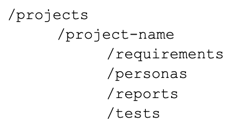
The requirements folder is where functional requirements live. The more context the LLM understands, the better it can fine-tune the personas to the project and ensure the scenarios being tested are correct and useful. In most cases, we'll create our own personas - but it doesn't hurt to have the LLM generate several personas from the requirements alone. After all, the agent might surface creative ideas we'd never thought of.
The reports folder holds the final Markdown reports for each test run, highlighting UX friction points, successes, failures, and WCAG audit results.
The tests folder is the place for Playwright. Since Synthetic User Testing focuses on persona and scenario-based testing, it's useful to connect the scenarios that have been created to Playwright: automated quality assurance testing.
What does a Synthetic User Testing session look like in practice?
To show this in action, we ran a session on our own Origin website, which is currently undergoing a revamp, so the findings are directly useful.
Defining the persona
We created a project called 'Origin Supply Chain' and used three example personas. One of them is Marcus:
|
Marcus Role: IT Systems Manager Company: Multi-entity logistics group Location: Auckland, New Zealand Who they are Marcus is 38, IT Systems Manager at a multi-entity logistics group that runs SAP for finance and a legacy WMS built in-house. He's been pulled into a TMS evaluation by the ops team and his job is to answer two questions before the exec team signs off: can this integrate with what we already have, and is it secure enough to pass their ISO compliance audit? He's not the decision-maker, but he's the veto. A bad outcome for Marcus is recommending a vendor who later turns out to have a "custom integration project" price tag attached, or a security posture that fails the audit. Goals for this session
What matters to them
Behaviours to simulate
Success criteria
Red flags to watch for
|
We’ll test to see whether Marcus can successfully reach his goals: learning whether SAP and WMS connections are a ‘default’ option or a ‘bespoke’ option, completing a vendor risk assessment and to find out if our API is accessible. Specific goals, let’s put our current website to the test.
MCP set up

Before starting the test, it's worth confirming that both MCPs are running correctly so the agent can browse through the project. With chrome-devtools and playwright both confirmed as live, the agent has access to both - meaning we can perform the user testing process and follow up with automated QA testing.
Approach
Since working with LLMs is inherently non-deterministic, we need to provide sufficient guidelines and structure to ensure consistent output. To do this, we created two markdown files:
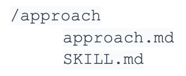
Both files contain instructions regarding the workflow. The synthetic user testing process is highly structured to ensure consistent, actionable results. It begins by defining a clear persona and real-world task scenarios (Goals). The core execution involves a "think-aloud" session, where the agent narrates the persona's inner monologue while navigating the product at both desktop and mobile viewports.
Friction is classified by severity (Goal-blocking 🔴, Goal-friction 🟠) and documented in a report that prioritises actionable recommendations. The process concludes by generating two separate engineering artefacts: Playwright tests for automated regression coverage on critical findings, and an automated accessibility audit using axe-core across all tested pages.
The think-aloud method
The most useful insights from user tests often come to light using the think-aloud method: a simple approach that asks participants to verbalise their thoughts while using a product. The markdown file stresses the importance of first-person, present-tense narration - including honesty about confusion and reasoning for decision-making.
Workflow summary
-
Persona defined (.md file in personas/)
-
Chrome MCP live browser exploration, goal-first
-
Friction report written to reports/
-
Playwright .spec.ts written from report findings, saved to tests/personas/
-
Accessibility audit run
What did the Synthetic User Testing run reveal?

The synthetic run for Marcus, the IT Systems Manager, provided immediate, valuable clarity on the self-service evaluation journey. While he ultimately needed a sales call to complete his vendor audit, the test identified several strong points and key areas for improvement.

On the positive side, Marcus easily found our verifiable ISO 27001:2022 certification. However, friction arose in two areas: the website was ambiguous about whether SAP integration was a standard connector or required a bespoke project, and the "fully managed service" messaging incorrectly suggested a total lack of customer-accessible API access.
The agent did its job well - it recognised the earlier report without being specifically instructed to, and decided to start a fresh session. The browser opened at two different screen resolutions. The first issue came to light quickly: we do not mention API access on our website. The agent then moved on to the second goal - the security audit - found the security page, and cleared the ISO 27001 goal after independently verifying the JASANZ register link.

Within five minutes, the report was written.

Think-aloud excerpt: Goal 1
Goal 1: Understand what integration options Origin offers - specifically whether SAP and existing WMS connections are standard or bespoke
Outcome: 🟠 Goal-friction
"OK, I'm on the homepage. 'Logistics software for operators who refuse to compromise' - fine, I'm not here for the marketing. Let me find Integration." Marcus scans the nav - Products is right there. He opens the dropdown.
"Integration - yes, and the description says 'connect your systems, partners, and customers with our fully managed supply chain integration service.' Fully managed. I'll note that." He clicks Integration.

He reaches the connector ecosystem list. "Internal Systems: ERP (SAP, NetSuite), WMS, TMS, Forwarding. Good - SAP is there by name. WMS too. But it's a bullet point, not a connector catalogue. I don't know if SAP is a standard connector or if 'we've done it before, let's scope your project' is the actual answer."
He scrolls to the bottom. Contact form. "Of course. Nothing else here - no spec sheet, no connector list, no pricing. I'll look at Crossfire." He navigates to Crossfire's site, finds the SAP connector listed. "So SAP is a real connector, not a hypothetical. But I'm now on a completely different website and I still don't know what's pre-built versus what Origin would want to scope as a project."
Recommendations

Based on the Marcus audit, here are the prioritised fixes:
RecommendationsHigh impact
Medium impact
Low impact
|
What did we learn from running the proof of concept?
Fine-tuning of reporting is ongoing
The initial test runs quickly showed that LLM agents need ongoing refinement to ensure output is consistently useful. While the think-aloud method immediately pinpointed friction, raw outputs sometimes lacked the structured clarity needed for a busy engineering team. The lesson: continually fine-tune the agent's prompts to produce not just data, but highly specific and actionable analysis - so every test run delivers maximum value for sprint planning and design review.
A dedicated recommendations section changes everything
A key structural improvement was adding a 'Recommendations' section at the top of the final report. Initially, findings were buried deep within the goal-specific outcomes, making it difficult for busy stakeholders to grasp the high-impact fixes quickly. By introducing prioritised, action-oriented items - such as "Add Security to the About dropdown nav" - we created an easily scannable list that transformed the report from an audit document into a sprint-ready playbook.
Persona quality determines result quality
The utility of synthetic user testing is highly dependent on matching digital personas to real-life users and specific scenarios. Generalised testing yields general, low-value feedback. When we apply highly specific goals - like Marcus's need to find "AWS data residency" or "standard vs. bespoke integration" - the results immediately become powerful. This underscores the need for rigorous persona engineering at the outset of every project, ensuring scenarios are not just functional checks, but true reflections of actual high-value user behaviour.
When should design teams use Synthetic User Testing?
Synthetic User Testing is most valuable during the prototyping phase, before real-world user acceptance testing - when catching obvious friction early saves the most time and cost.
Its core value lies in providing a pre-flight check for your UX and UI by rapidly testing complex user journeys, validating flows, and catching obvious friction points in a fraction of the time. For Sandfield, this method is useful both internally and externally: it accelerates our design process by providing quick, validated answers from different perspectives during prototyping, and it ensures we deliver higher quality, functionally sound products to our clients through automated validation and accessibility audits.
The specific findings from the Marcus audit - run on our current Origin website - are now being actioned to directly inform the new website revamp, ensuring our new design addresses critical evaluator needs like security detail and integration clarity. This systematic approach ensures that by the time a product reaches real-world User Acceptance Testing, the majority of obvious friction has been smoothed out.
Furthermore, by using Playwright to turn key friction points into automated QA tests, we build a robust regression suite into the project from the very start.
Frequently asked questions
No. Think of it as the pre-flight check before you bring in the pilots. It catches the obvious friction so your real user sessions can be dedicated to exploring more complex, high-impact challenges.
Any LLM with browser tool support works. We used both GitHub Copilot and Claude Code, configured with chrome-devtools-mcp and playwright-mcp.
From prompt to full Markdown report, the Marcus session took under five minutes. Writing Playwright specs from the findings adds more time, but the initial audit is very fast. The key to executing this quickly is having the right persona and testing criteria set up before starting the test run.
Automated QA testing checks whether functionality works. Synthetic User Testing checks whether a specific persona can achieve their goals. It's scenario-based and judgment-driven, not simply pass/fail.
Ideally during the prototyping phase, early and often. The earlier friction is caught, the cheaper it is to fix — and the more focused your real user testing sessions can be.
